Skip to content
Every business, a different appCase study · showcase project

Dispatch control room for a trucking company

A mid-sized carrier with 32 trucks ran its entire operation over the phone, Excel and WhatsApp. We built a control room where the dispatcher sees the fleet, margins and legal driving limits in real time — and gave drivers a mobile app that keeps track of documents and rest on its own.

Industry
Trucking & freight
Type
Internal system + mobile app
Scope
6 modules + driver app
Project
from CZK 380,000
Delivery
8–10 weeks

Where they started

Dispatch ran the way it often does at carriers: a morning round of "where are you and what are you hauling" calls, an Excel schedule only its author could read, and margins calculated by the accountant a month after the truck came home. Plus two driving-time fines, because nobody watched driver fatigue in real time.

The owner didn't want a "system for everything". He wanted to see his 32 trucks on one screen and stop worrying about fines. Everything else grew out of interviews with dispatchers and drivers.

What hurt the most

  • 01Fleet position was checked by phone — ten calls a day
  • 02Only one person in the company could read the Excel schedule
  • 03Haul margins were known with a month's delay
  • 04Driving-time fines: CZK 86,000 in a single year
  • 05CMRs and delivery notes in folders across cabs — and sometimes nowhere

Walk through the system screen by screen

Every screen comes from a real, built showcase application — clickable UI with fictional data, not a static mockup.

velin.vase-doprava.cz/prehled
Dispatch control room for a trucking company — Operations overview
30 smorning check of the whole operation
01

Operations overview

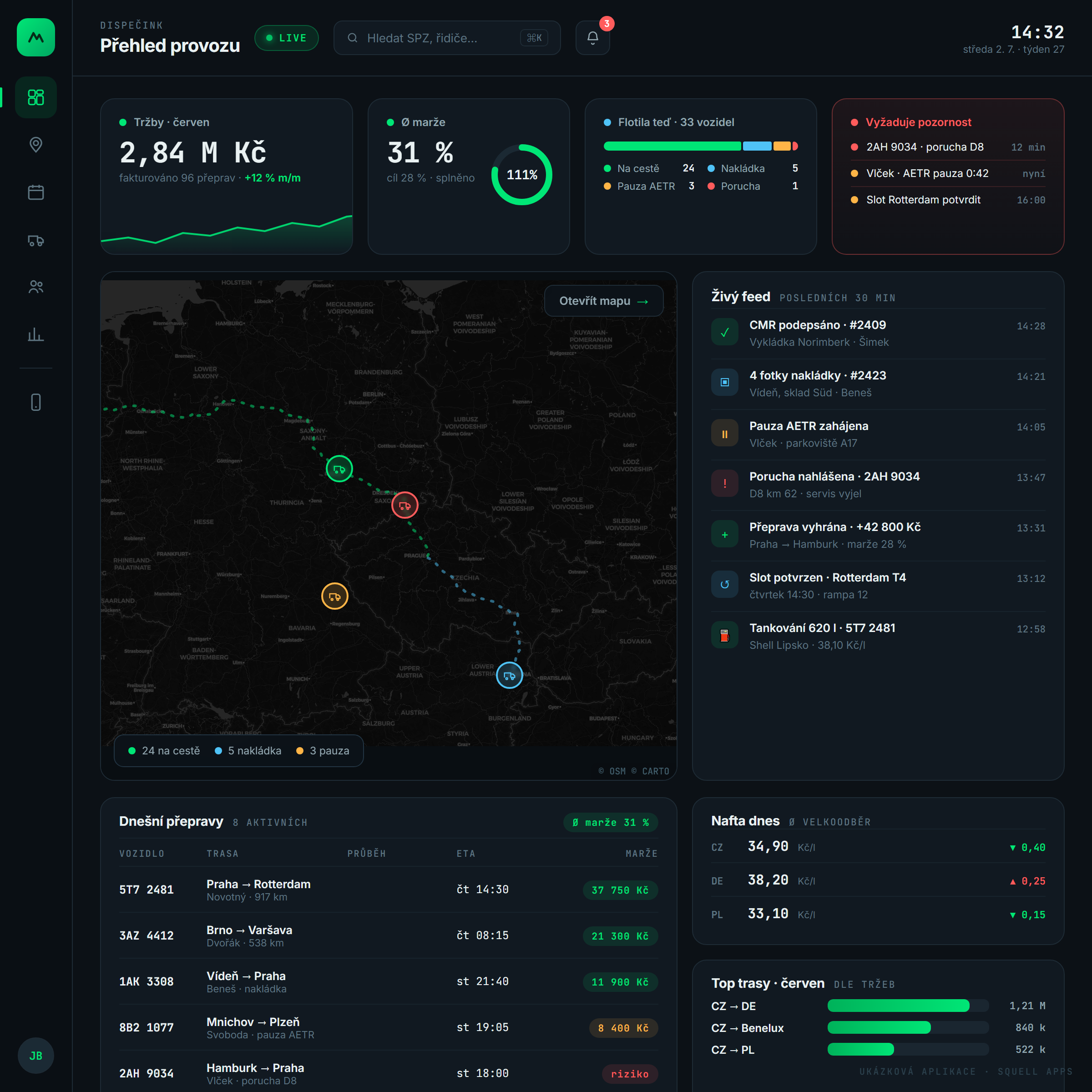
The control room's landing screen. After clocking in, the dispatcher doesn't need to click anywhere — within thirty seconds they know whether the night was calm: what was invoiced, how margins track against target, what the fleet is doing and what exactly is on fire.

What the dispatcher gets here

  • Monthly revenue with a daily trend and month-over-month comparison
  • Average margin against target — the ring fills until it's met
  • Fleet status as a colour bar: en route · loading · break · breakdown
  • The "Needs attention" card sorts problems by urgency, not by time
  • Live feed: signed CMRs, uploaded photos, started breaks, breakdowns
  • Diesel prices in CZ/DE/PL and the month's most profitable lanes

Why the client wanted it

The owner put it precisely: "I want one place where I know whether I'm making money before I finish my coffee." So the dashboard is built around answers, not tables — what happened, what it cost and what needs my attention.
velin.vase-doprava.cz/mapa
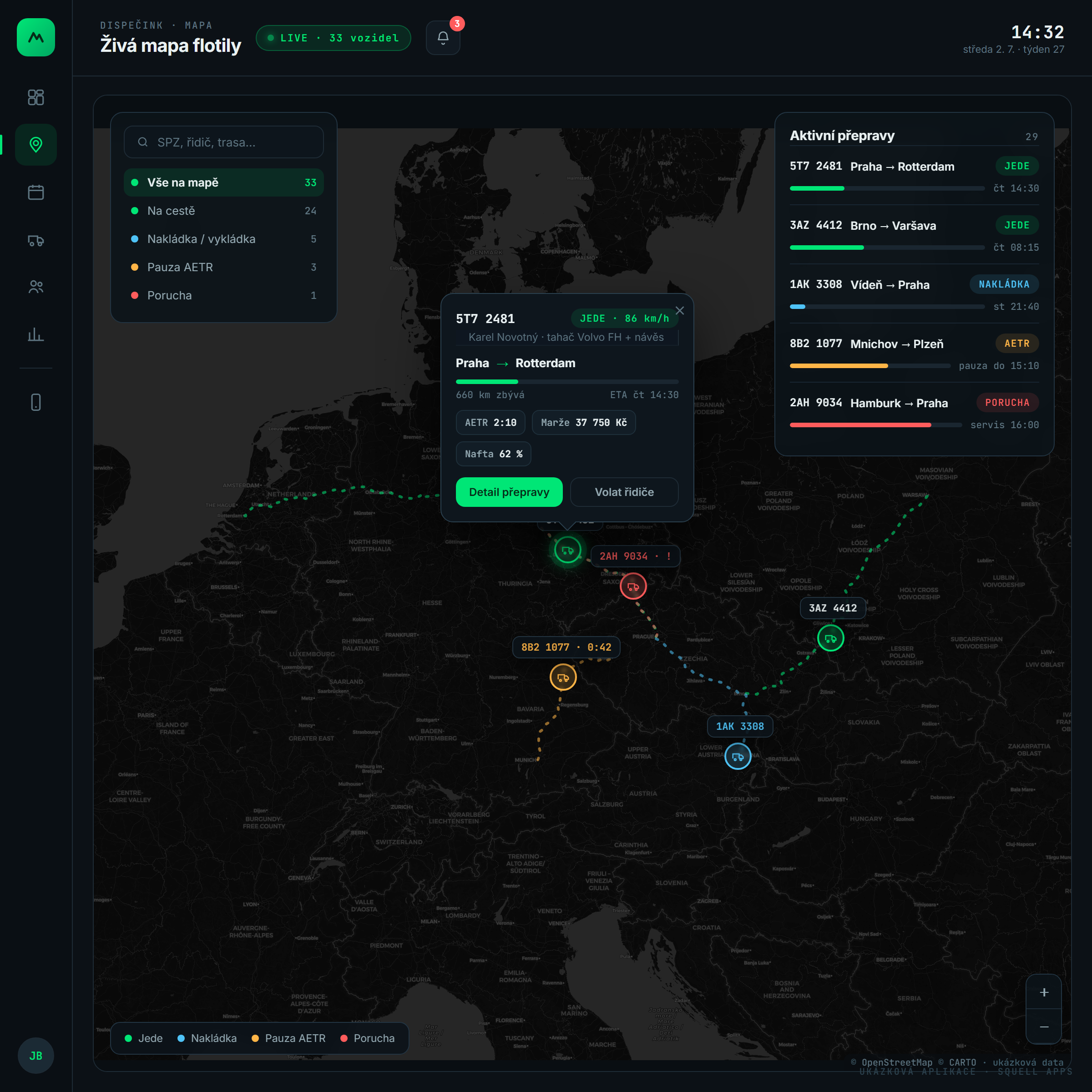
Dispatch control room for a trucking company — Live map of Europe
10× → 0×daily "where's the truck?" question
02

Live map of Europe

The heart of the control room. A real map with real roads — every truck sits exactly where it's actually driving, routes follow motorways, and colour tells the status at a glance: green driving, blue loading, amber resting, red broken down.

What the dispatcher gets here

  • Position and speed of every vehicle in real time from GPS units
  • Routes follow real motorways — D8, A17, A2 — not straight lines
  • Click a truck: driver, route progress, ETA, remaining drive time, margin
  • Status filters — one click to show only breakdowns or trucks on break
  • Search by plate, driver or route
  • A "Call driver" button right on the map, no hunting for numbers

Why the client wanted it

The most common sentence in the office used to be "call him and ask where he is". Ten calls a day, three minutes each. The map erased the question entirely — and most of the interruptions to drivers behind the wheel with it.

velin.vase-doprava.cz/plachta
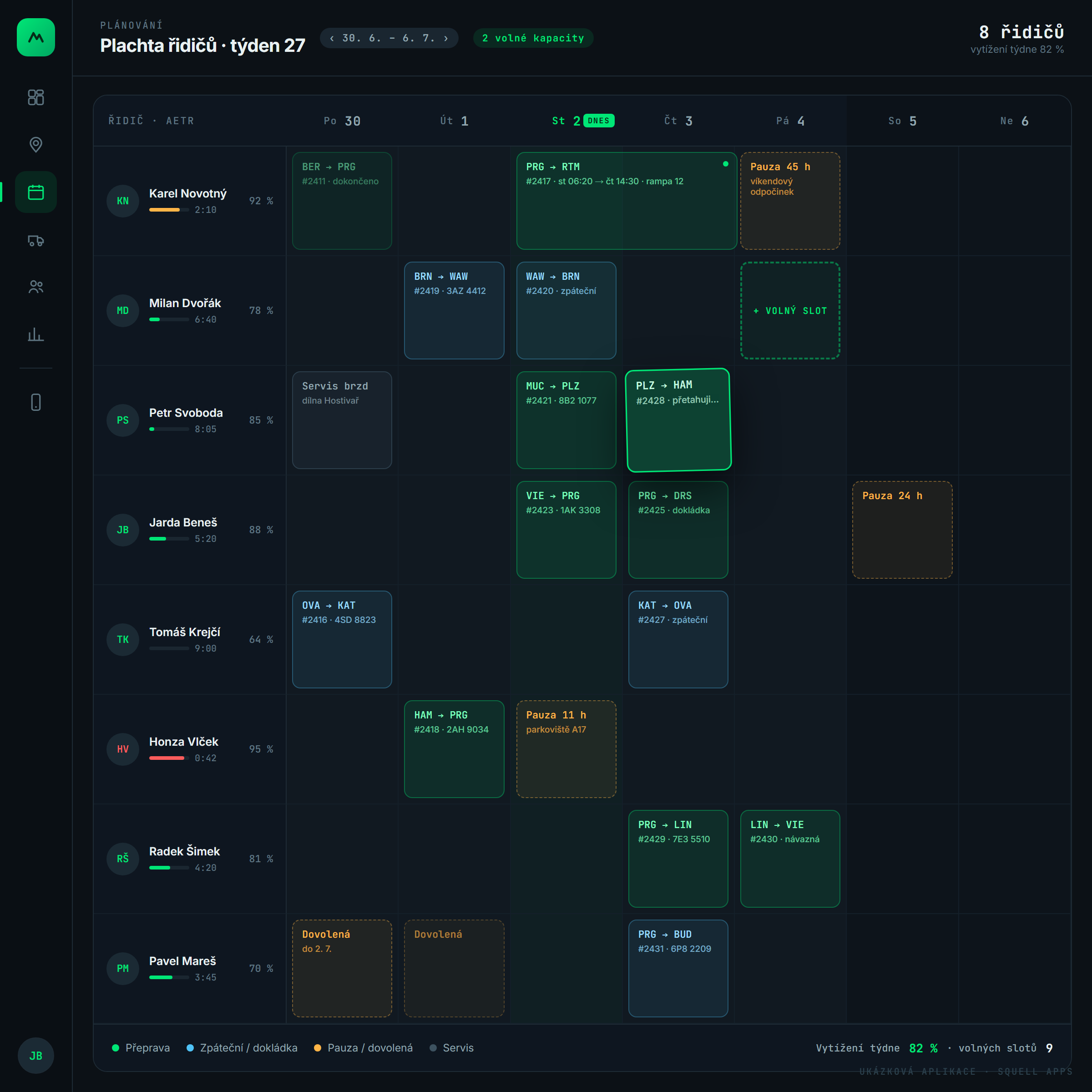
Dispatch control room for a trucking company — Driver schedule
3 h → 15 minbuilding the weekly schedule
03

Driver schedule

Weekly planning that used to live in Excel is now held by the system. Hauls are dragged between drivers and days with the mouse, each driver's utilisation recalculates live, and remaining legal drive time shows right next to the name — you simply can't schedule a driver over the limit.

What the dispatcher gets here

  • Drag & drop: grab a haul and drop it on another day or driver
  • Driver utilisation in percent + a mini bar of remaining drive time
  • Free slots glow green — spare capacity is visible at a glance
  • Breaks, holidays and services are first-class blocks in the schedule
  • Today is highlighted, weekends dimmed — the eye knows where it is
  • Summary below: weekly utilisation and open slots

Why the client wanted it

One dispatcher used to spend a whole morning building the schedule — and when he was on holiday, nobody planned at all. Now anyone on shift does it in fifteen minutes and the change history saves itself.

velin.vase-doprava.cz/prepravy/2417
Dispatch control room for a trucking company — Haul card
55 %this haul's margin — visible instantly
04

Haul card

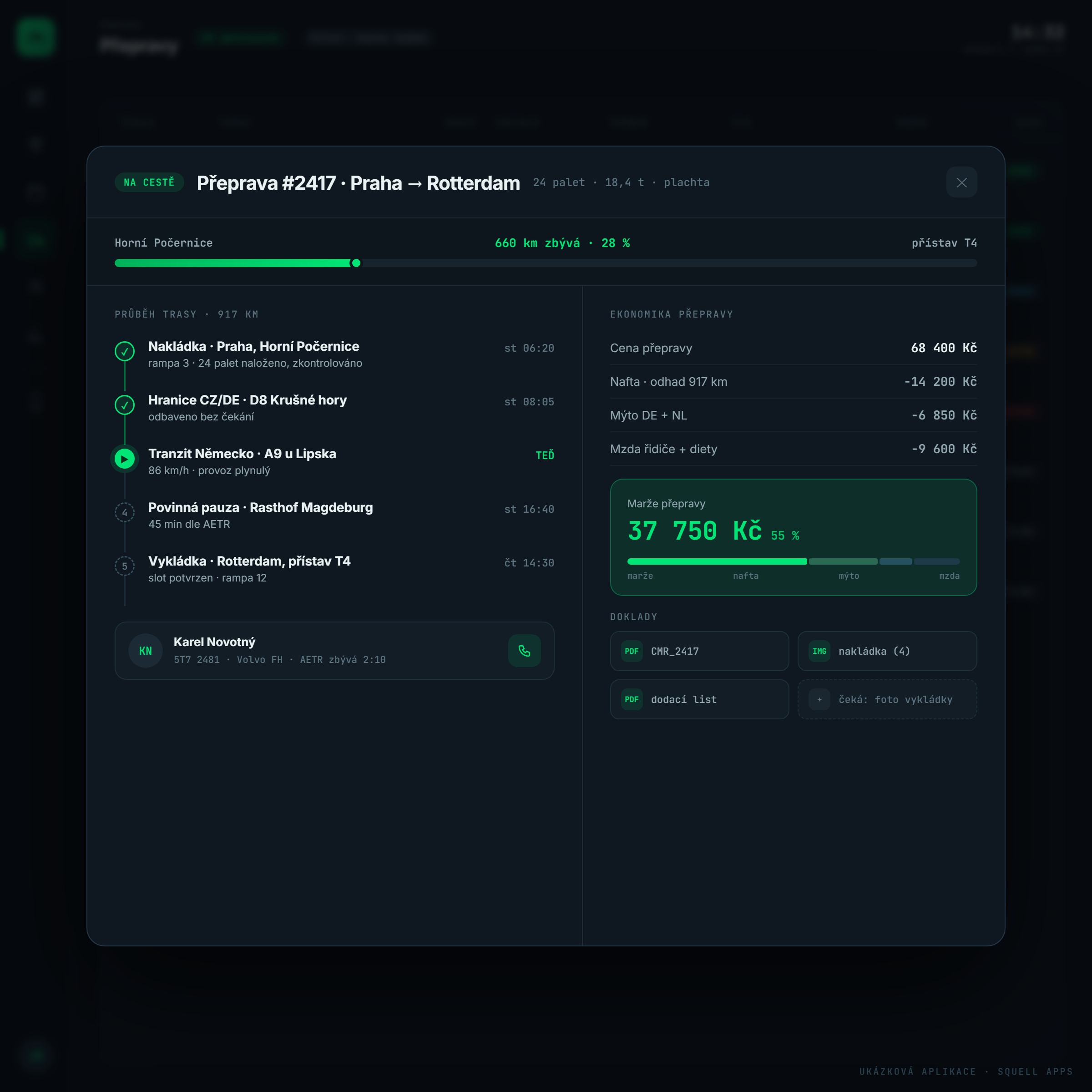
One haul, one truth. The card shows the whole route as a timeline — loading to unloading — with the economics right beside it: price minus diesel, tolls and wages equals margin. The dispatcher sees it while the truck is still on the road.

What the dispatcher gets here

  • Timeline: loading, border, transit, mandatory break, unloading
  • Route progress: 917 km total, what's left, current ETA
  • Haul economics item by item down to the margin
  • Cost breakdown as a colour bar — where the money goes, at a glance
  • Documents attached to the haul: CMR, loading photos, delivery note
  • Missing paperwork reports itself — "waiting: unloading photo"

Why the client wanted it

The accountant used to compute margins in Excel a month back — a badly priced haul surfaced when nothing could be done about it. Now the dispatcher sees the margin while planning and turns down bad deals up front.

velin.vase-doprava.cz/ridici
Dispatch control room for a trucking company — Drive-time traffic light
0driving-time fines since launch
05

Drive-time traffic light

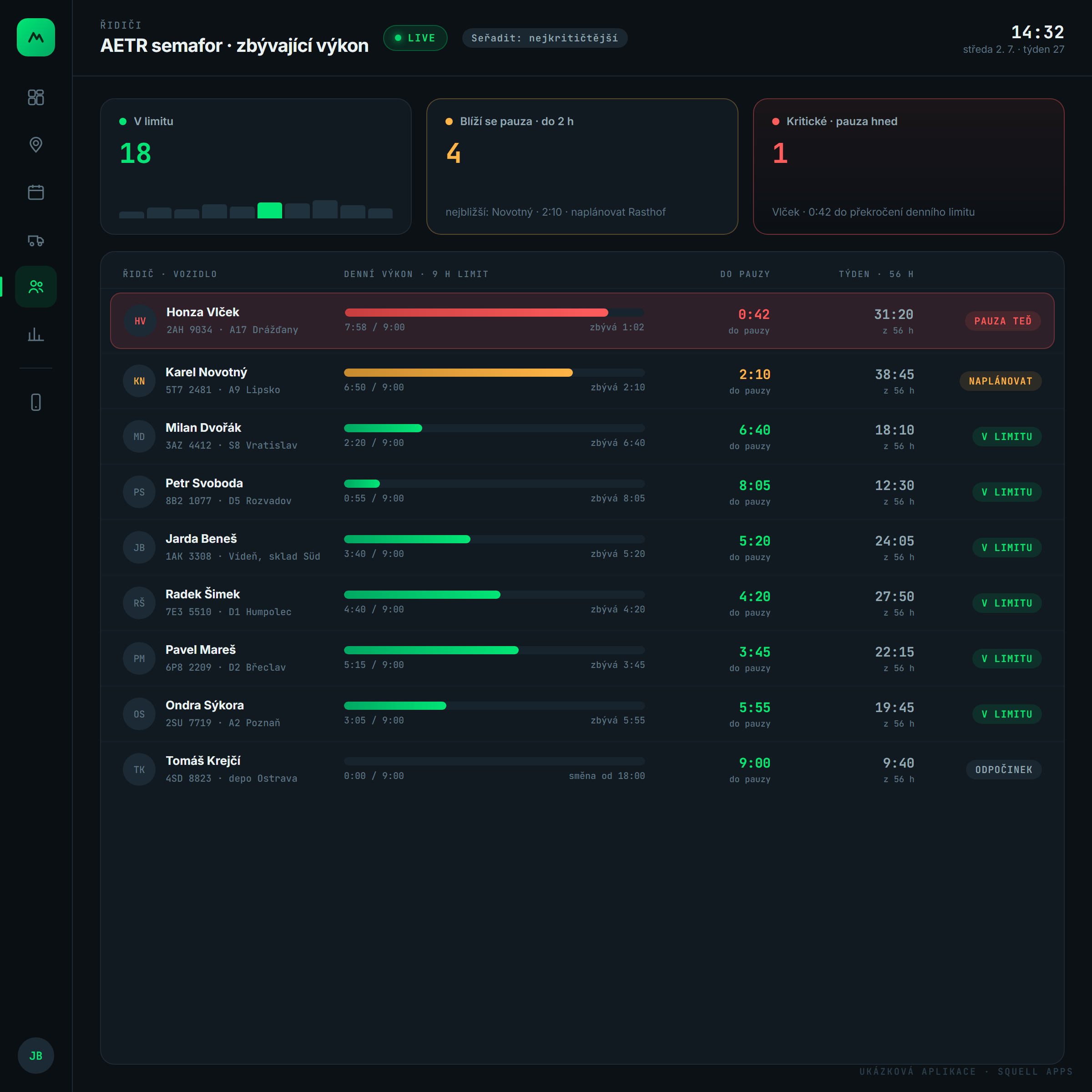
Legal driver limits — 9 hours a day, 56 a week — are watched by the system, not the dispatcher's memory. The traffic light sorts drivers by urgency: red means "break now", amber "plan it", green all clear. The countdown runs in real time for everyone.

What the dispatcher gets here

  • Daily drive time as a bar: driven / limit / remaining
  • Countdown to the mandatory break, to the minute
  • The 56-hour weekly limit next to the daily one — nothing added by hand
  • A critical driver jumps to the top with a "BREAK NOW" action
  • Suggestions where to plan the break — rest stops along the route
  • Drive-time history retrievable for roadside inspections

Why the client wanted it

Two driving-time fines in a single year cost the company CZK 86,000 — and nearly one driver's licence. The owner says this screen paid for itself before we finished the rest of the system.

velin.vase-doprava.cz/analytika
Dispatch control room for a trucking company — Fleet cost analytics
−4.2 %cost per km in the first quarter
06

Fleet cost analytics

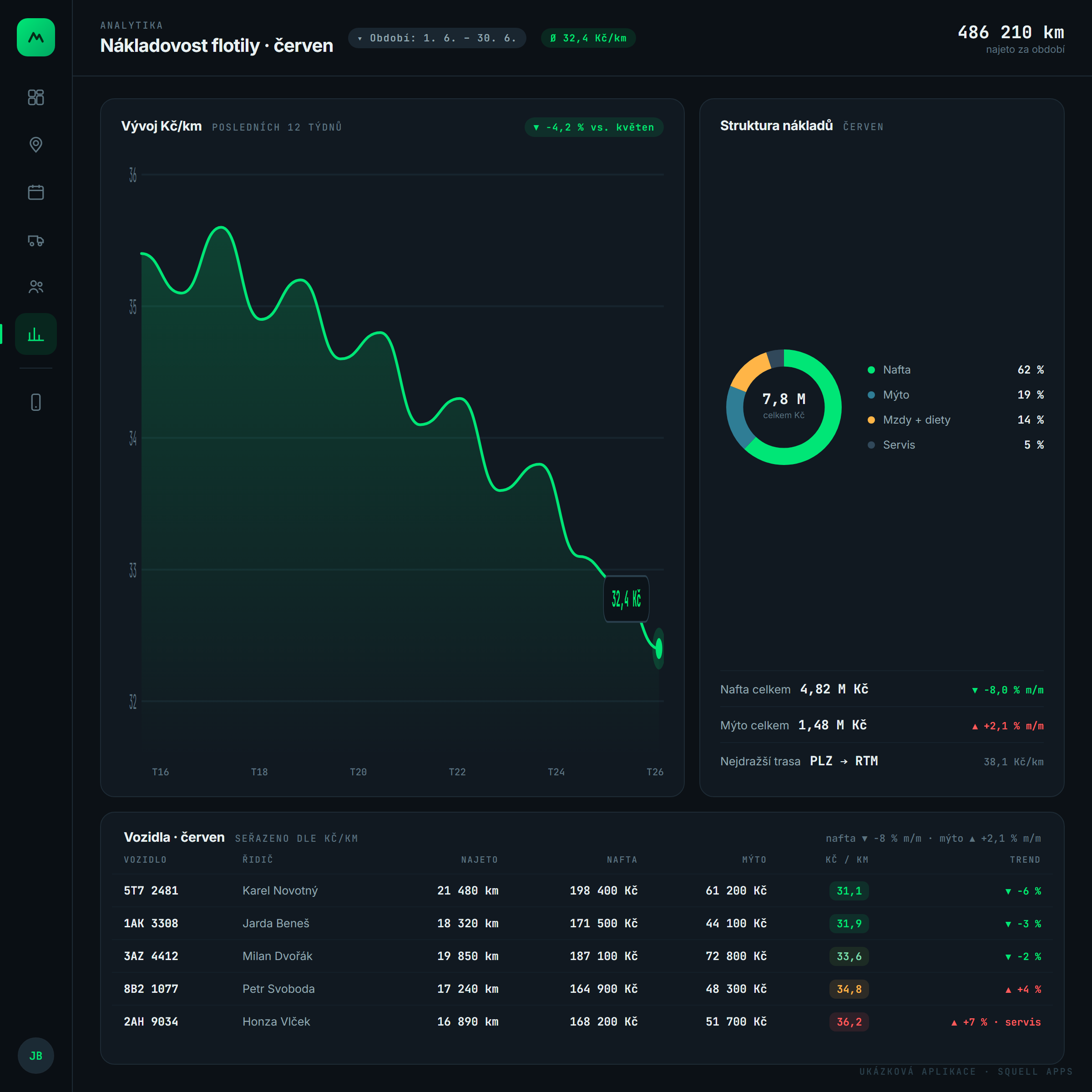
Analytics that answer a single question: what does a kilometre cost us — and why. A weekly CZK/km trend, cost structure and a per-vehicle table with a colour heat map. An expensive truck shows up before it eats the profit.

What the dispatcher gets here

  • CZK/km trend over the last 12 weeks
  • Cost structure: diesel 62 %, tolls 19 %, wages 14 %, service 5 %
  • Per-vehicle table: distance, diesel, tolls, CZK/km with a heat map
  • A trend per truck — rising consumption gives away a service due
  • Diesel prices by country for refuelling strategy
  • One-click export for the accountant

Why the client wanted it

The oldest tractor ran 7 % more expensive than the rest of the fleet — nobody saw it in Excel for years, while the heat map lit it up red on day one. The numbers decided the replacement within three weeks.

Standalone module

Driver mobile app

The driver has nothing to learn — the app has four buttons and serves everything important by itself: the next route step, a drive-time countdown ring, a document checklist and messages from dispatch. A photographed CMR reaches the haul before the truck leaves the ramp.

Why it worksPhotos attach to the haul

The driver photographs the CMR and dispatch and accounting see it instantly. No more paper in the cab.

Finger signatureCMR without paper

The customer signs the screen and a PDF flies to both parties.

Offline modeWorks without signal

At a mountain rest stop everything stores and sends after reconnecting.

The app watches AETRThe break announces itself

The countdown runs for driver and dispatcher alike. The fine never comes.

  • Next route step with one-tap navigation
  • Drive-time ring: remaining hours visible to driver and dispatcher
  • Document checklist — what's photographed and what's still waiting
  • A document photo attaches straight to the haul, no e-mails
  • Customer signs with a finger on the screen, PDF goes to both sides
  • Offline mode: in the mountains everything stores and syncs later

Why the client wanted it

The average driver age at the company is 52 and the condition was clear: no training sessions. So we built the app as four big buttons — and the oldest driver used it on day one without a single question.

0sheets of paper in the cab

What it brought the company

Figures are illustrative — they show the typical impact for a carrier of this size.

0

driving-time fines since launch

previously two a year, CZK 86,000

15 min

weekly schedule planning

previously one dispatcher's whole morning

+3 pp

average haul margin

bad deals get declined up front

100 %

documents digital, attached to hauls

CMRs, photos, delivery notes

Under the hood

The control room is a web app — it runs in a browser at dispatch and at the owner's home, with no installs or per-seat licences. Vehicle positions come from the GPS units the company already had; we connected them through the telematics API. The mobile app is a PWA: installed from a link, working even without signal.

Next.js + ReactPostgreSQLGPS telematics via APIMaps: OpenStreetMap + CARTOReal-time over WebSocketPWA · offline modeRoles & permissionsEU hosting · GDPR

How a project like this happens

  1. 1

    A day at dispatch

    We sit next to the dispatcher and map how the operation really runs — not how it's described in meetings.

  2. 2

    A clickable design

    Within two weeks you get a clickable application like this one. You decide over real UI, not wireframes.

  3. 3

    Module by module

    We build in parts — the map first, because it hurts the most. Each module ships as soon as it's done.

  4. 4

    A pilot on part of the fleet

    Five trucks run it for two weeks in parallel. Whatever doesn't fit gets fixed before the whole company sees it.

  5. 5

    Production and beyond

    We don't abandon the system after launch — we collect feedback and deliver further modules.

The dispatch control room is a showcase concept built by our studio: a real, clickable application with fictional data. It shows how we build custom internal systems — yours would be shaped by your operation.

Running your operation on phone calls and Excel?

We'll put it on one screen. Within two weeks you'll see a clickable design of your own system — no strings attached.

Write to us